What Makes a List Useful
Lists: Your First Data Structure
A list (called an array in some languages) stores items in a specific order. You can:
- Access any item by its position: names[0] grabs the first item. O(1) — instant.
- Add items to the end: names.append("Zoe"). O(1) — instant.
- Walk through every item in order: for name in names. O(N) — visits each item once.
Lists preserve the order you put things in. The first item stays first. The last stays last.
# A list of pets
pets = ["cat", "dog", "cat", "fish", "dog"]

print(pets[0])   # "cat"  — O(1) instant
print(pets[3])   # "fish" — O(1) instant
print(len(pets)) # 5 — duplicates kept
Notice: "cat" appears twice. "dog" appears twice. Lists allow duplicates. They store exactly what you give them, in the order you gave it.
But lists have a weakness. Watch what happens when you ask: is "fish" in this list?
# Membership check — is "fish" in the list?
if "fish" in pets:    # scans ["cat", "dog", "cat", "fish"...] one by one
    print("found!")   # had to check 4 items before finding it
The computer checks "cat" — no. "dog" — no. "cat" — no. "fish" — yes! It scanned 4 items to find the answer. With 1,000 items, it might scan all 1,000. That membership check costs O(N).
Predict the Scan Cost
You have a list of 500 student names in random order.
You want to check whether "Zara" appears in the list.
students = ["Alex", "Maria", ..., "Zara", ...]  # 500 names
if "Zara" in students:
print("enrolled")How Sets Work Differently
Sets: Built for Membership Questions
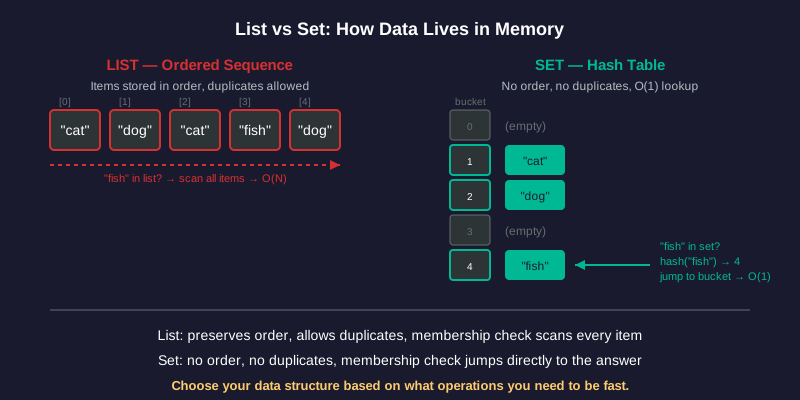
A set stores unique items using a technique called hashing. When you add an item, the computer calculates a hash (a numeric fingerprint) that tells it exactly where to store that item.
When you check membership, the computer calculates the same hash & jumps directly to the right spot. No scanning.
# A set of pets
pets = {"cat", "dog", "cat", "fish", "dog"}

print(pets)      # {"cat", "dog", "fish"} — duplicates removed
print(len(pets)) # 3 — only unique items
Notice three differences from lists:
1. No duplicates. "cat" appeared twice in the input but the set keeps only one copy.
2. No guaranteed order. The set might print items in any arrangement.
3. No index access. You cannot write pets[0] — sets have no positions.
The tradeoff: you lose order & duplicates. You gain O(1) membership testing — checking whether an item exists takes the same time whether the set has 5 items or 5 million.
# Membership check — is "fish" in the set?
if "fish" in pets:    # hash("fish") → jump to bucket → found
    print("found!")   # checked exactly 1 spot, not 4
Set vs List Membership
You have 500 student names stored in a set instead of a list.
students = {"Alex", "Maria", ..., "Zara", ...}  # 500 names
if "Zara" in students:
print("enrolled")Side-by-Side Comparison
Operations Cheat Sheet
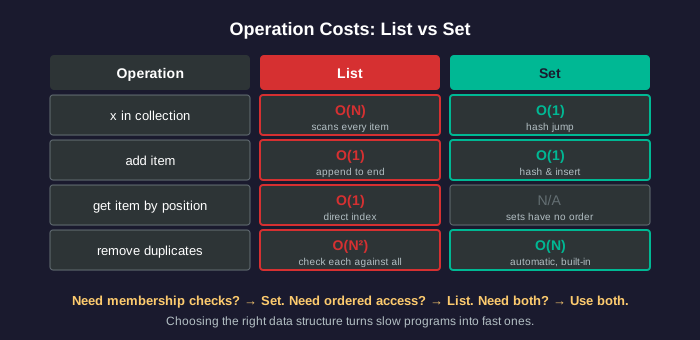
Use a list when you need:
- Items in a specific order (a playlist, a recipe, a queue)
- Access by position (items[3])
- Duplicates preserved ("cat" appears 3 times = 3 cats)
Use a set when you need:
- Fast membership checks ("have I seen this before?")
- Automatic duplicate removal
- No concern about order
Use both when you need order AND fast lookup:
seen = set()     # O(1) membership checks
result = []      # preserves insertion order
for item in data:
    if item not in seen:  # O(1) check
        seen.add(item)    # O(1) add
        result.append(item)  # O(1) append
# Total: O(N) — one pass, each step O(1)
This "set + list" pattern gives you the best of both: ordered results with fast duplicate detection.
Pick the Right Structure
Three problems. For each, decide: list, set, or both?
1. You need to store a playlist of songs in the order the user added them.
2. You need to quickly check if a username has already been taken.
3. You need to remove duplicate emails from a mailing list but keep them in the order they signed up.
The Deduplication Problem
Problem: Remove Duplicates, Keep Order
You receive a list of email signups. Some people signed up twice. You need to send one email per person, in the order they first signed up.
Attempt 1: list only (slow)
signups = ["alice@a.com", "bob@b.com", "alice@a.com", "carol@c.com"]
unique = []
for email in signups:
    if email not in unique:  # O(N) scan of unique list
        unique.append(email)
# Works! But: O(N) check × N items = O(N²)
With 100 signups, this does ~5,000 checks. With 10,000 signups: ~50,000,000 checks.
Attempt 2: set + list (fast)
signups = ["alice@a.com", "bob@b.com", "alice@a.com", "carol@c.com"]
seen = set()
unique = []
for email in signups:
    if email not in seen:   # O(1) hash lookup
        seen.add(email)     # O(1) add to set
        unique.append(email) # O(1) append to list
# O(1) check × N items = O(N)
Same result. Same order. But: 10,000 signups now requires ~10,000 checks instead of ~50,000,000.
Calculate the Speedup
The list-only version runs at O(N²). The set+list version runs at O(N).
You have 10,000 email signups to deduplicate.
Finding Common Elements
Problem: Find Items in Both Lists
You have two class rosters. You need to find students enrolled in both classes.
Slow approach: nested loops O(N × M)
class_a = ["Alice", "Bob", "Carol", "Diana"]
class_b = ["Bob", "Diana", "Eve", "Frank"]
both = []
for student in class_a:        # N iterations
    if student in class_b:     # M scans each time
        both.append(student)
# O(N × M) — each student scanned against all of class_b
Fast approach: convert one list to a set O(N + M)
class_a = ["Alice", "Bob", "Carol", "Diana"]
class_b_set = set(class_b)     # O(M) to build
both = []
for student in class_a:        # N iterations
    if student in class_b_set: # O(1) each time
        both.append(student)
# O(N + M) — build the set once, check N times at O(1) each
Or even simpler using Python's built-in set intersection:
both = set(class_a) & set(class_b) # O(N + M)The & operator finds all items that appear in both sets.
Rewrite for Speed
A school has two clubs with 200 members each. This code finds students in both clubs:
chess_club = [...]   # 200 names
art_club = [...]     # 200 names
both_clubs = []
for student in chess_club:
    if student in art_club:
both_clubs.append(student)The Decision Framework
Your Data Structure Decision Framework
Every time you write code that stores a collection of items, ask:
1. Do I need items in order? → list
2. Do I need fast membership checks? → set
3. Do I need both order AND fast checks? → set + list together
4. Do I need duplicates? → list (sets drop duplicates)
---
The key insight from this lesson: the same program, solving the same problem, can run 1,000× to 1,000,000× faster just by choosing the right data structure. No clever tricks. No complicated math. Just asking: what operations does my code do most often? Then picking the structure where those operations cost O(1) instead of O(N).
This lesson covered lists & sets. Other data structures exist (dictionaries, trees, heaps) that solve other problems. The decision framework stays the same: understand your operations, then choose the structure that makes them cheap.
---
Want to go deeper? Our Big O lesson covers growth rates & scaling calculations in detail. See Big O: How Fast Is Fast Enough?. Our unhamming course covers the real-world defect (MOAD-0001) where this exact list-to-set fix produced a 1,000× speedup in production software. See The Missing Chapter: Algorithmic Complexity.
Debug This Code
A student wrote this code to count how many unique words appear in a book:
words = book.split()           # list of all words
unique_count = 0
checked = []
for word in words:             # N words
    if word not in checked:    # scans checked list
        checked.append(word)
        unique_count += 1
print(unique_count)
The book has 100,000 words.