ყოველდღიური ავტომატური სისტემები
ინსტრუმენტები, რომლებიც ჩვენთვის პასუხობენ
თქვენ უკვე ყოველდღე იყენებთ ავტომატურ სისტემებს, ალბათ ამის შესახებ არც კი ფიქრობთ. ავტომატური სისტემა არის ნებისმიერი ინსტრუმენტი, რომელიც იღებს ინფორმაციას და თავისით აწარმოებს პასუხს ან მოქმედებას, ისე რომ ადამიანი არ წყვეტს ყველა ნაბიჯს.
აქ არის რამდენიმე, რომელსაც თითქმის დარწმუნებით იყენებდით:
- რუკების აპლიკაცია, რომელიც ირჩევს ყველაზე სწრაფ მარშრუტს დანიშნულების ადგილამდე.
- ძებნის ველი ან სახლის დავალების დამხმარე, რომელიც პასუხობს შენს მიერ აკრეფილ კითხვას.
- მაღაზიის ვებგვერდი, რომელიც გირჩევს, რა იყიდო შემდეგ ან აჩვენებს ფასს.
- მთარგმნელი, რომელიც ერთ ენას მეორე ენად აქცევს.
- მართლწერის შემოწმების პროგრამა, რომელიც ხაზს უსვამს სიტყვას და გთავაზობს გასწორებას.
ეს ხელსაწყოები სასარგებლოა. ისინი მხოლოდ ხელსაწყოები არიან. ამ გაკვეთილის მიზანი არ არის მათი შიში ან ბრმად ნდობა, არამედ ისწავლო, როგორ გამოიყენო ისინი ისე, როგორც გამოცდილი მუშა იყენებს ნებისმიერ ხელსაწყოს.
გახურება
სანამ ღრმად ჩავუღრმავდებით, იფიქრე შენს კვირაზე.
რაში არიან ძლიერები ავტომატური სისტემები
რეალური ძლიერი მხარეები
ავტომატური სისტემები ზოგიერთ საკითხში მართლაც ძლიერები არიან, ხშირად ადამიანზე ბევრად უკეთესები:
- სწრაფი. მარშრუტის აპლიკაცია ათასობით გზის კომბინაციას ადარებს იმ დროში, რაც თქვენს თვალის დახუჭვას სჭირდება.
- უშრეტი. ის 900-ე ფასს ისევე ყურადღებით შეამოწმებს, როგორც პირველს. მას არასდროს ეწყინება და არ აუწყება ძილი.
- თანმიმდევრული. მიეცი მას ერთი და იგივე შეყვანა ორჯერ — ორჯერაც ერთსა და იმავეს გააკეთებს. მას „ცუდი დღე“ არ აქვს.
- უმკლავდება დიდ მოცულობის მონაცემებს. შეუძლია ერთდროულად გადახედოს უზარმაზარ სიას, გრძელ დოკუმენტს ან მთელ რუკას — იმაზე მეტს, ვიდრე ადამიანს თავში შეეძლო დაემახსოვრებინა.
როდესაც სამუშაო დიდი, განმეორებადი და მოსაწყენია, ავტომატური სისტემა ხშირად საუკეთესო ინსტრუმენტია. ეს არის მისი სამშობლო ტერიტორია.
რაში არის ცუდი ავტომატური სისტემები
რეალური სისუსტეები
იგივე ინსტრუმენტს აქვს რეალური ბრმა წერტილები. ავტომატური სისტემები ცუდია შემდეგში:
- გაიგოს, რა მიაჩნდა სინამდვილეში. ის კითხულობს შენს სიტყვებს, არა შენს აზრებს. თუ რუკების აპს სთხოვ „ბანკი“, შეიძლება გაგზავნოს მდინარის სანაპიროზე ან ქალაქის მეორე მხარეს მდებარე არასწორ ფილიალში.
- იმის ცოდნა, როდესაც ისინი ცდებიან. კალკულატორი, რომელსაც არასწორი რიცხვები შეაყვანეს, სრული თავდაჯერებულობით გასცემს არასწორ პასუხს. ინსტრუმენტს არ აქვს შეგრძნება, რომელიც ამბობს: „ჰმმ, ეს რაღაც არასწორად გამოიყურება.“
- განახლებულობის შენარჩუნება. ინსტრუმენტმა შეიძლება არ იცოდეს, რომ გუშინ გზა დახურულია, ან რომ ფასი ერთი საათის წინ შეიცვალა, ან რომ ფაქტი შეიცვალა მას შემდეგ, რაც ის შეიქმნა.
- სამართლიანობა. სისტემა სწავლობს ძველი მონაცემებიდან. თუ ეს მონაცემები უსამართლო იყო, ინსტრუმენტს შეუძლია მშვიდად გაიმეოროს ეს უსამართლობა, ამავდროულად ნეიტრალურად გამოიყურებოდეს.
დიდი ხაფანგი: თავდაჯერებულად არასწორი
ეს არის ყველაზე მნიშვნელოვანი იდეა ამ მთელ გაკვეთილში. ავტომატიზებულ სისტემას შეუძლია იყოს თავდაჯერებულად არასწორი. ის გვაძლევს გლუვ, დარწმუნებულ პასუხს, რომელიც უბრალოდ არასწორია. ის არ ჟღერს გაურკვევლად, როცა ცდება, რადგან არ შეუძლია გააცნობიეროს, რომ ცდება. ლამაზი პასუხი არ არის იგივე, რაც სწორი პასუხი.
კარგად და ცუდად
შენი ჯერია, რომ გაარკვიო
მოდი, დავრწმუნდეთ, რომ ძლიერი და სუსტი მხარეები შენთვისაც ნათელია საკუთარი სიტყვებით.
შეამოწმე სანამ ენდობი
ჩვევა, რომელიც გიცავს: გადამოწმება
იმიტომ რომ ხელსაწყო შეიძლება თავდაჯერებულად შეცდეს, ჭკვიანი გადაწყვეტილებაა გადამოწმება მისი პასუხის სანამ ენდობი, განსაკუთრებით მაშინ, როცა პასუხი მნიშვნელოვანია.
გადამოწმება ნიშნავს პასუხის შემოწმებას სხვა წყაროსთან: მეორე წყაროსთან, შენს სწრაფ შეფასებასთან, ცნობილ ფაქტთან ან ჯანსაღ აზრთან.
რამდენად დეტალურად უნდა გადამოწმო, უნდა ემთხვეოდეს იმას, თუ რამდენი რისკია საქმეში:
- სიმღერის არჩევა დასაკრავად? თუ ხელსაწყო შეცდება, უბრალოდ გამოტოვებ. თითქმის არ ღირს შემოწმება.
- მეგობრის სახლამდე გზის გაგება? შეხედე რუკას და დარწმუნდი, რომ სწორი მიმართულებით მიუთითებს.
- რეცეპტის, წამლის დოზის, თანხის ან ანგარიშისთვის საჭირო ფაქტის გამოყენება? ყურადღებით შეამოწმე სანდო წყაროსთან. აქ თავდაჯერებული არასწორი პასუხი შეიძლება ძვირად დაგიჯდეს.
რამდენიმე სწრაფი გზა გადასამოწმებლად: თავში უხეშად შეაფასე და ნახე, პასუხი სწორ დიაპაზონშია თუ არა, შეამოწმე მეორე ხელსაწყოთი ან სანდო ვებგვერდით, ჰკითხე ადამიანს, რომელიც იცის, ან შეამოწმე მცირე ნაწილი სანამ მთელზე დაეყრდნობი.
რას გააკეთებდი ჯერ?
შენს ეკრანზე თავდაჯერებული პასუხი ჩნდება
აქ არის რეალური სიტუაცია. შენ საშინაო დავალების დამხმარეს სვამ კითხვას: „რამდენი წუთია ერთ კვირაში?“ ის მაშინვე, ძალიან დარწმუნებული ხმით პასუხობს:
> „კვირაში 6 720 წუთია.“
პასუხი ჟღერს თავდაჯერებულად და კონკრეტულად. ის ასევე არასწორია.
სამუშაო გადაეცი, გადაწყვეტილება შეინარჩუნე
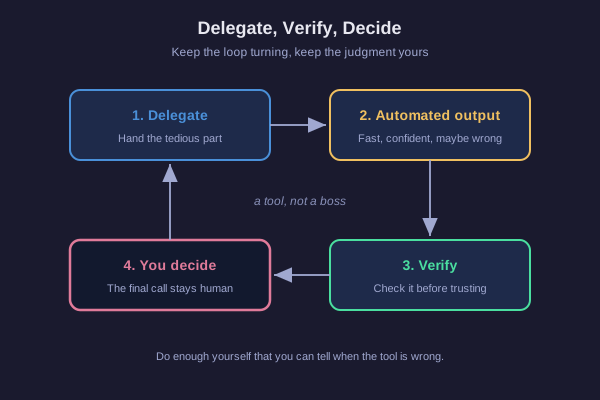
ვინ არის პასუხისმგებელი?
თუ მთელ გაკვეთილს ერთად შევაჯამებთ, ის ქმნის მარყუჟს. თქვენ გადაეცით მოსაწყენი ან ძალიან დიდი დავალება ინსტრუმენტს. ინსტრუმენტი ქმნის შედეგს. თქვენ ამოწმებთ ამ შედეგს. შემდეგ თქვენ იღებთ გადაწყვეტილებას, რა უნდა გააკეთოთ. და კვლავ ბრუნდებით წრეზე.
შეამჩნიე, ვინ ინახავს მნიშვნელოვან ნაწილს. შენ აბარებ მოსაწყენ საქმეს, მაგრამ ორ რამეს თვითონ ინახავ:
- გადაწყვეტილება (judgment). შენ წყვეტ, არის თუ არა პასუხი საკმარისად კარგი იმისათვის, რომ გამოიყენო.
- საბოლოო არჩევანი. ინსტრუმენტი გთავაზობს; შენ ირჩევ.
არსებობს კიდევ ერთი წესი, რომელიც ამოწმებას შესაძლებელს ხდის. გააკეთე საკმარისი სამუშაო თვითონ, რომ შეძლო ინსტრუმენტის შემოწმება. თუ არასდროს გისწავლია დამატება, ვერ გაი� пойმებ, როდის შეაყვანეს კალკულატორში არასწორი რიცხვები. თუ თვითონ არასდროს უყურებ რუკას, ვერ გაიგებ, როდის გაგზავნის მარშრუტი გრძელი გზით. საკუთარი მცირე უნარის შენარჩუნებაა ის, რაც გაძლევს საშუალებას დაიჭირო ინსტრუმენტის შეცდომები.
ამიტომ დაებარე მოსაწყენი ნაწილები, მაგრამ დარჩი მძღოლად. კარგი ინსტრუმენტი არის დამხმარე, და არა უფროსი.
დავაბაროთ თუ თვითონ გადავწყვიტოთ?
კიდევ ერთი სიტუაცია
წარმოიდგინე, რომ საყიდლების საიტი ახარისხებს პროდუქტების სიას და ერთ-ერთს ყველაზე ზემოთ ათავსებს, სათაურით „საუკეთესო არჩევანი თქვენთვის“. ეს მოსახერხებლად გამოიყურება. თქვენ მაინც აპირებდით ამ კატეგორიიდან რაღაცის ყიდვას.
რას წაიღებ თან?
ბოლო აზრი
ახლა თქვენ გაქვთ მარტივი ჩვევა ყველა ავტომატური სისტემისთვის, რომელსაც კი ოდესმე გამოიყენებთ: დაევალეთ მოსაწყენი ნაწილი, გადაამოწმეთ შედეგი მაშინ, როცა მნიშვნელოვანია, და გადაწყვეტილება დატოვეთ საკუთარ თავზე. საკმარისად იმუშავეთ, რომ დაიჭიროთ ინსტრუმენტი, როცა ის თავდაჯერებულად ცდება.
ეს ინსტრუმენტები არც ჯადოსნურია და არც მტერი. ისინი დამხმარეები არიან. თქვენ რჩებით ის, ვინც გადაწყვეტს.